We have compiled a list of manufacturers, distributors, product information, reference prices, and rankings for Input support software.
ipros is IPROS GMS IPROS One of the largest technical database sites in Japan that collects information on.

Input support software Product List and Ranking from 7 Manufacturers, Suppliers and Companies | IPROS GMS

Last Updated: Aggregation Period:Jun 03, 2026~Jun 30, 2026
This ranking is based on the number of page views on our site.

Input support software Manufacturer, Suppliers and Company Rankings

Last Updated: Aggregation Period:Jun 03, 2026~Jun 30, 2026
This ranking is based on the number of page views on our site.

  1. テクノプロ コンサルティング・パートナーズ社 システムソリューション事業部 Kanagawa//Information and Communications
  2. シーエスエー Shimane//software
  3. エスワイシステム Toyama//IT/Telecommunications
  4. 4 null/null
  5. 5 テクノウェーブ Tokyo//Industrial Electrical Equipment

Input support software Product ranking

Last Updated: Aggregation Period:Jun 03, 2026~Jun 30, 2026
This ranking is based on the number of page views on our site.

  1. [Estimation Raiden Series] PDF image data & multi-format input support function シーエスエー
  2. [For Schools] WorkingVoice Paperless Solution テクノプロ コンサルティング・パートナーズ社 システムソリューション事業部
  3. Creating a Trusted Company through On-Site DX - WorkingVoice テクノプロ コンサルティング・パートナーズ社 システムソリューション事業部
  4. Excel is a good listener. エスワイシステム
  5. 4 Touch panel text input support software "KanTouch SDK" テクノウェーブ

Input support software Product List

1~10 item / All 10 items

Displayed results

Touch panel text input support software "KanTouch SDK"

Touch panel text input support software "KanTouch SDK"

This is a text input support software for touch panels. Since it is an embedded software keyboard, it can be easily integrated into the system under development, allowing for efficient system development without the need to develop the text input portion independently. It can be operated from the customer's application via API functions. A customization tool is included. Compatible with Windows® 2000 and Windows XP. Supports Visual C++®. Compatible with MS-IME and ATOK®.

  • Expansion Boards
  • Other measurement, recording and measuring instruments
  • Software (middle, driver, security, etc.)
  • Input support software

Added to bookmarks

Bookmarks list

Bookmark has been removed

Bookmarks list

You can't add any more bookmarks

By registering as a member, you can increase the number of bookmarks you can save and organize them with labels.

Free membership registration

[Estimation Raiden Series] PDF image data & multi-format input support function

You can directly read design breakdowns and estimates! Input functionality that does not depend on format or style!

This is an introduction to the "PDF Image Data & Multi-Format Input Function" of "Sekisan Raiden." This function allows the text in image data to be processed in the same way as text data, using our unique technology. The formats of the target data (design breakdowns, estimate formats) can accommodate almost all formats used in the construction industry, without being restricted to specific formats, including government-designated formats (RIBC format). In large projects with a lot of estimate data, the amount of data to be entered can be enormous. In such cases, if there is a design breakdown or estimate that can be utilized, it can be directly read and used as input data for "Sekisan Raiden," regardless of the format. Design breakdowns or estimates can be converted into image data or text data using OCR devices or scanners, allowing for direct reading and use as input data. *For more details, please refer to the PDF materials or feel free to contact us.*

  • Business Intelligence and Data Analysis
  • Software (middle, driver, security, etc.)
  • Input support software

Added to bookmarks

Bookmarks list

Bookmark has been removed

Bookmarks list

You can't add any more bookmarks

By registering as a member, you can increase the number of bookmarks you can save and organize them with labels.

Free membership registration

[For Schools] WorkingVoice Paperless Solution

Streamline grade management! Achieve paperless with voice input.

In educational institutions, accurate and efficient grade management is essential. Particularly when recording a large number of students' grades manually, input errors and time wastage become significant challenges. Handwritten records also complicate aggregation and analysis, increasing the burden on teachers. The WorkingVoice paperless solution provides a voice system as an EXCEL add-in, addressing these issues by digitizing handwritten records. By directly inputting voice data into your existing EXCEL format, it enables immediate paperlessness and contributes to the efficiency of grade management tasks. 【Usage Scenarios】 - Recording exam results and classroom comments - Tracking students' learning progress - Information sharing among teachers 【Benefits of Implementation】 - Reduced input time - Decreased errors - Improved data aggregation efficiency - Cost savings through paperlessness

Added to bookmarks

Bookmarks list

Bookmark has been removed

Bookmarks list

You can't add any more bookmarks

By registering as a member, you can increase the number of bookmarks you can save and organize them with labels.

Free membership registration

Construction-oriented WorkingVoice paperless solution

The first step towards DX! Streamlining paper records at construction sites with voice input.

In the construction industry, site management often involves keeping daily records on paper, which makes transcription and aggregation time-consuming. In particular, records taken on-site are easily affected by weather and working conditions, and there is a risk of loss or deterioration of these records. To address these challenges, digitizing records is essential. The WorkingVoice paperless solution provides a voice system as an Excel add-in, allowing direct voice input into your existing Excel format, achieving paperlessness on the same day. By opening an Excel format file and clicking the voice input button, you won't need to touch the mouse until the data entry task is complete. Input errors and cell movements can also be executed using "voice commands" without clicking. 【Usage Scenarios】 - Creating daily reports for construction sites - Preparing progress reports - Maintaining safety management records 【Benefits of Implementation】 - Reduction in record-keeping time - Decrease in recording errors - Faster information sharing

Added to bookmarks

Bookmarks list

Bookmark has been removed

Bookmarks list

You can't add any more bookmarks

By registering as a member, you can increase the number of bookmarks you can save and organize them with labels.

Free membership registration

Creating a Trusted Company through On-Site DX - WorkingVoice

Achieving on-site DX with voice input. Creating a trusted company with accurate data - WorkingVoice.

WorkingVoice, which realizes on-site DX through voice input, eliminates handwritten notes and double entries, enabling accurate data recording on the spot. It can be implemented with just a PC and a headset, and familiar Excel can also be utilized. Users can input data hands-free and eyes-free without stopping their work, preventing human errors in real-time. Accurate data supports quality and contributes to building trust in companies.

  • Other production management systems
  • Input support software

Added to bookmarks

Bookmarks list

Bookmark has been removed

Bookmarks list

You can't add any more bookmarks

By registering as a member, you can increase the number of bookmarks you can save and organize them with labels.

Free membership registration

Excel is a good listener.

Input numerical values into Excel cells from the microphone's audio! Directly set the read-out numerical data into Excel cells.

Are you having trouble with voice input into Excel? This software directly sets the voice-input numerical data into the currently selected cell in Excel. You can also input short sentences that are not numerical (within about 20 seconds). It will repeat the entered content back to you by voice. You can use voice commands to move to adjacent cells up, down, left, or right. It utilizes the voice recognition feature of the Google Chrome browser, so the conversion accuracy is high. There is no need for a Google user ID or login to Google. You can choose to use either of the two input modes: [Numerical / General Text]. It can also be used to input into Windows' built-in Notepad or the free software Terapad. It is useful for quickly creating drafts.

  • Voice Recognition Software
  • Input support software

Added to bookmarks

Bookmarks list

Bookmark has been removed

Bookmarks list

You can't add any more bookmarks

By registering as a member, you can increase the number of bookmarks you can save and organize them with labels.

Free membership registration

Quality Data Analysis Software 'i-Analyzer'

Since this product standardizes the evaluation criteria, the calculation results will not vary slightly between users!

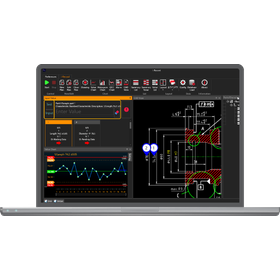
The "i-Analyzer" is a full browser-based quality data analysis software that provides smart quality data analysis capabilities. It smartly manages the vast amount of inspection and measurement data used in mass production processes. Various conditions such as process capability, stability of control charts, and the presence of out-of-tolerance data can be set to comprehensively determine the pass/fail judgment of inspection characteristics. Additionally, it is equipped with tools for efficiently managing large amounts of data, including stratified display, data alignment by management number, and programmable trend management functions in control charts. 【Features】 ■ Browser-based ■ Advanced characteristic comparison functions ■ Event input functions ■ Advanced filtering functions ■ Complete essential charts for quality management *For more details, please refer to the related links or feel free to contact us.

  • Business Intelligence and Data Analysis
  • Input support software

Added to bookmarks

Bookmarks list

Bookmark has been removed

Bookmarks list

You can't add any more bookmarks

By registering as a member, you can increase the number of bookmarks you can save and organize them with labels.

Free membership registration

QuickRF Keyboard I/F for Manufacturing Industry

Don't you think that system development is quite challenging for actual operations on-site?

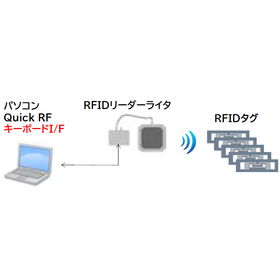
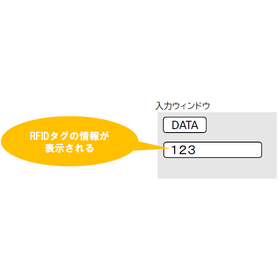
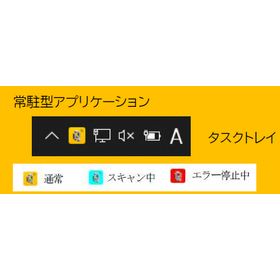
In quality control within the manufacturing industry, ensuring product traceability and accurate data entry is essential. Particularly, rapid information acquisition on the manufacturing line and identifying the causes of defects require real-time and precise data integration. Manual input errors can lead to quality degradation and rework, potentially affecting production efficiency. Our "QuickRF Keyboard I/F" is a resident application that allows input like a keyboard, similar to a barcode reader, and solves these challenges by displaying the read information from RFID tags in a specified window. [Usage Scenarios] - Parts management on the manufacturing line - Confirmation of product traceability - Information recording during defect occurrences - Streamlining inventory management [Benefits of Implementation] - Increased efficiency in input tasks and reduction of human errors - Real-time accurate data collection - Acceleration of the quality management process - Improved traceability

  • image_28.png
  • image_29.png
  • IC tag
  • Input support software

Added to bookmarks

Bookmarks list

Bookmark has been removed

Bookmarks list

You can't add any more bookmarks

By registering as a member, you can increase the number of bookmarks you can save and organize them with labels.

Free membership registration

BLuE【Direct input of measurement values into forms and drawings】

Attention electrical contractors! The numerical input for report creation goes directly into Excel!?

We would like to introduce the benefits of implementing our measurement support system, 'BLuE'. It is possible to directly input measurement values into Excel reports, PDF drawings, and CAD drawings. When integrated with Excel, you can directly input measurement values into the selected cells of the reports you usually use. When using CAD or PDF, you can automatically fill in markers and measurement values at the indicated points on existing drawings. 【Features】 ■ Direct input of measurement values into reports and drawings ■ Direct input of measurement values into the selected cells of the reports you usually use when integrated with Excel ■ Automatic filling of markers and measurement values at the indicated points on existing drawings when using CAD or PDF *For more details, please refer to the PDF materials or feel free to contact us.

  • others
  • Input support software

Added to bookmarks

Bookmarks list

Bookmark has been removed

Bookmarks list

You can't add any more bookmarks

By registering as a member, you can increase the number of bookmarks you can save and organize them with labels.

Free membership registration